
Some time in August, your child’s school probably switched on an AI chatbot for them. Nobody sent you a form. Google opened Gemini to K-12 students of all ages, districts had a few weeks between the announcement and the switch, and by the first week of September the trade press was reporting that schools had been caught unprepared.
So here is the question most parents actually want answered, and it is not “is AI good or bad”. It is: can I see what my child typed into it?
The short answer is that the conversations are governed, retained and controlled, and none of those controls belong to you. They belong to whoever administers your district’s Google account.
Who actually holds the controls
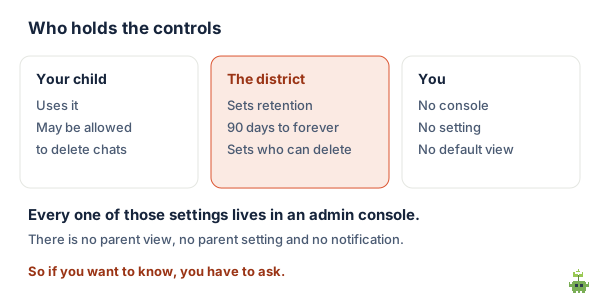
This is not speculation. Google’s own administrator documentation for Gemini conversation history says, to the administrator: “you can decide how conversation history works for your team, including if users can keep or delete their conversations.”
The settings a district can choose between include:
- How long conversations are kept, with retention options running from 90 days to 540, to 1080, to keeping them indefinitely.
- Whether a student is allowed to delete their own conversations at all.
- Whether students get to choose their own auto-delete setting, or whether the district chooses for them.
Notice what is not on that list. There is no parent setting, no parent view and no parent notification. The vocabulary of the documentation is “administrator” and “users”, and in a school your child is the user and the district is the administrator. You are not in the model at all.
To be precise about what this does and does not mean: the existence of retention controls is not the same as a district routinely reading transcripts, and I have not seen evidence that they do. The point is narrower and more useful. Decisions are being made about your child’s AI conversations, and the decision-maker is not you and is probably not their teacher either.
What actually happened, and why your school seemed unready
Because it largely was. Google announced the expansion in June 2026 and access arrived for students in August, which left districts a short summer to write policy for something that had not previously existed for under-13s.
Some states had a head start because they had already required one. Ohio, for instance, requires every district to hold an AI policy clarifying when it is appropriate for teachers and students to use artificial intelligence. If your state has a similar requirement, your district has a document, and you are entitled to read it.
Five questions worth asking your school
These are deliberately specific. General questions get general answers, and the person you are emailing usually does not set the policy and will forward it to someone who does, so make it easy to forward.
- Is Gemini, or any AI assistant, enabled for my child’s account? Start here, because a surprising number of parents assume yes or assume no and are wrong either way.
- What is our conversation retention set to? This has a literal numeric answer: 90 days, 540, 1080, or indefinite. If nobody can tell you, that itself is the finding.
- Can my child delete their own conversations, and can I request a copy? The first is a real setting. The second is a policy question your district may never have been asked, which is a reason to ask it rather than a reason not to.
- Does our district have a written AI policy, and may I have it? In some states this is required. Everywhere else it is still a reasonable request.
- What is it actually being used for in class? “Available” and “used for assessed work” are very different situations and warrant very different levels of interest from you.
The uncomfortable part: nobody knows if it works
It would be convenient to tell you the tools are either brilliant or dangerous. The honest position in September 2026 is that the effectiveness of personalized-learning chatbots has not been independently established, and very few rigorous studies have even been run. That is the state of the evidence, reported in August 2026, and it is why a growing number of researchers are uneasy about the pace of rollout.
That unease is not fringe. In July 2026 parents and teachers in New York City rallied for a two-year moratorium on AI in public schools, and the associated petition gathered thousands of signatures.
What follows from that is not panic, it is proportion. An untested tool used for looking things up is a small matter. An untested tool that your child is graded on, whose transcripts you cannot see, is a larger one. Question five above is the one that tells you which situation you are in.
Open chatbot, or something with edges
A general assistant is built to answer anything, which is exactly why the visibility question is hard: there is no expected shape to the conversation, so there is nothing to report to you except the whole transcript.
A tool built for practice has edges. It asks a question, marks the answer, and moves. Because it knows what it asked, it can tell you what happened without anyone reading a chat log: the actual questions, the actual answers, which topics are going badly and which are fine. That is a different architecture rather than a different brand, and it is worth understanding the distinction before you judge any individual product.
We are building one of these, so treat that as the interest it is. Sprout Tutor is in development: a step-by-step tutor where a child works through questions tied to their own state’s standards behind a PIN, and the adult sees the literal questions they got right and wrong. It is not open-ended chat, deliberately. What matters for this page is not our product but the category difference, which applies whatever you end up using.
What to do this week
- Send the five questions. One email to the teacher, copied to the principal or the technology lead. It is a reasonable request and it is usually answered.
- Ask your child to show you. Not as an interrogation. “Show me what it does” gets you more in five minutes than any policy document will.
- Agree what it is for at home. Looking things up, yes. Producing work that gets graded, that is a conversation worth having explicitly rather than discovering later.
- Watch the homework, not the tool. If work that comes back is suddenly fluent and your child cannot explain any of it, that tells you more than the retention setting does.
The short version
Your child’s school probably enabled an AI chatbot in August with little notice, because Google opened Gemini to all K-12 students and districts had weeks rather than months.
The conversations are governed by real, specific settings: retention from 90 days to indefinite, and whether your child may delete their own. Every one of those settings lives in an administrator console. There is no parent view, no parent setting and no notification, so if you want to know, you have to ask, and the five questions above are what to ask.
And hold the evidence lightly in both directions. These tools are not established as effective and they are not established as harmful; very little rigorous research exists either way. That is a reason to know what your child is using and what it is used for, which is a smaller and much more achievable goal than deciding whether AI in schools is good.
Sprout Lessons builds standards-aligned lessons for grades K–12, around whatever your child is actually into. Start free.
Checked 15 September 2026. Conversation history controls and retention options are from Google’s administrator documentation for Gemini conversation history, which is written for Workspace administrators and whose available options differ by edition and add-on. The rollout timing and the Ohio policy requirement are from Education Week, 1 September 2026. The state of the research and the New York City moratorium petition are from The Christian Science Monitor, 7 August 2026. Settings, editions and policies change quickly: confirm the current position with your own district rather than relying on this page.
FAQ
Can I see my child’s AI chat history at school?
Not by default, and there is no parent-facing way to. Google’s administrator documentation for Gemini conversation history is written for Workspace administrators and tells them they can decide how conversation history works, including whether users can keep or delete their conversations. The vocabulary is administrator and users: in a school your child is the user and the district is the administrator, and parents are not in the model. If you want to know, you have to ask the district.
How long are my child’s AI conversations kept?
Whatever your district chose. The retention options in Google’s documentation are 90 days, 540 days, 1080 days, or indefinitely, and an administrator picks one. They can also decide whether students may delete their own conversations, or whether students get to choose their own auto-delete setting. This is a question with a specific answer, so it is worth asking for the specific answer.
Why did my child’s school do this without telling me?
Largely because of timing. Google announced the expansion of Gemini to K-12 students of all ages in June 2026 and access arrived in August, which left districts a short summer to write policy for something that had not previously existed for under-13s. Education Week reported at the start of September that schools were caught unprepared. Some states were further ahead because they had already required districts to hold an AI policy.
Is AI in schools actually good for learning?
Nobody knows yet, and that is the honest answer. As of August 2026 the effectiveness of personalized-learning chatbots had not been independently established and very few rigorous studies had been run, which is why a growing number of researchers are uneasy about the pace of rollout. In July 2026 parents and teachers in New York City rallied for a two-year moratorium and the petition gathered thousands of signatures. The evidence supports neither confidence nor panic.
What is the difference between an AI chatbot and an AI tutor?
Architecture, not branding. A general assistant is built to answer anything, so there is no expected shape to a conversation and nothing to report to an adult except the entire transcript. A tool built for practice asks a question, marks the answer and moves on, so because it knows what it asked it can report the actual questions and answers and which topics are going badly, without anyone reading a chat log. That distinction matters whichever product you end up using.
What should I actually do about it this week?
Four things, none of them dramatic. Send the five questions in one email to the teacher, copied to the principal or technology lead. Ask your child to show you what it does, which gets you more in five minutes than a policy document will. Agree explicitly what it is for at home, particularly whether it may be used on work that gets graded. And watch the homework rather than the tool: work that comes back suddenly fluent and cannot be explained tells you more than any retention setting.