
Yes, you can use an app or an online tutor in a Victorian home education program, and the VRQA says so in its own guidance. What it asks is that you name it: “It is not enough to list resources as ‘books’ or ‘the internet’.” And if you are selected for a review, “app extracts” are on its list of evidence it accepts. So an app can sit in two places: in the learning plan you lodge, and in the folder you keep in case of a review. This page covers both, using Sprout Tutor as the worked example because it is ours and we can tell you exactly what it records, and it is honest about the five learning areas no maths, English and science app can cover.
For the registration process itself (who must register, the form, deadlines and partial enrolment), start with homeschool registration in Victoria. This page assumes you have read it and are now writing the plan.
What the VRQA actually says about apps and tutors
Four lines from the VRQA’s page on developing a home education learning plan (updated 8 September 2026) settle most of the questions parents ask:
- You do not have to follow a curriculum. The page says you don’t have to “follow the Victorian Curriculum or the Australian Curriculum”, and you don’t have to buy one.
- Resources must be named. “It is not enough to list resources as ‘books’ or ‘the internet’.” Instead: “Include full book names, URLs, computer programs and apps”.
- Online courses count. “Doing online courses” is given as an example of an activity that can cover most key learning areas.
- Tutors count too. The page addresses the case where you “engage a tutor or arrange for your child to attend school for some subjects”; you do not need a learning area exemption for those areas.
The page also says the VRQA does not endorse commercial programs, and that you should check a program suits your child before you pay for one. That applies to us as much as anyone.
Where an app goes in the plan
The learning plan has four sections. An app touches two of them.
Section 2, the overview, asks “How will you record your child’s learning outcomes”. The VRQA’s own example answer is “I will record learning outcomes in a diary, a portfolio of completed activities and general observations.” If an app keeps a record, name it here alongside whatever else you keep. For example:
“I will record learning outcomes in a weekly diary, a portfolio of completed written work and projects, photographs of practical activities, and the practice record kept by Sprout Tutor (sproutlessons.com) for English, Mathematics and Sciences, which lists each question attempted, the answer given and the Victorian Curriculum content description it addresses.”
Section 4, the program, asks you to “explain how your education program substantially addresses the 8 learning areas for the year”. Under each learning area the app covers, name it as one resource among several, with its URL, and say what it is used for. A plan that says “Maths: Sprout Tutor” and nothing else is the same mistake as “Maths: the internet”, just with a brand name. Something like:
“Mathematics: daily practice of about 20 minutes using Sprout Tutor (sproutlessons.com), set to Year 4 of the Victorian Curriculum in Number and Measurement; hands-on measurement during cooking and the garden; the textbooks and readers you use, by title; weekly maths games with family.”
The honest arithmetic: three areas of eight
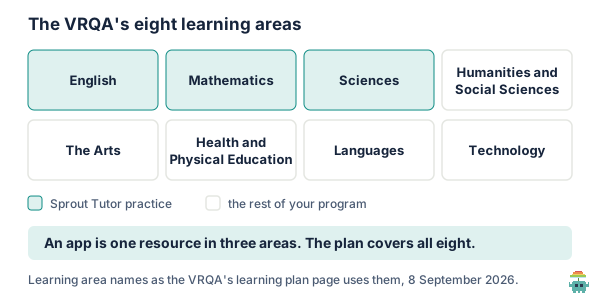
Sprout Tutor covers English, Mathematics and Science. The VRQA’s eight areas also include Humanities and Social Sciences, the Arts, Health and Physical Education, Languages, and Technology. No maths-and-English app covers those five, and none should claim to. They are where your own program does most of its work anyway: the excursion, the library, the sport, the instrument, the building project.
There is also a coverage limit inside those three: the tutor follows the Victorian Curriculum F–10 Version 2.0, for Years 1 to 10 only. It went into public beta on 22 September 2026, and while it is in beta it is free on every Sprout plan, including the free one. You are not required to follow the Victorian Curriculum, as above, but if you choose to, practice coded to it gives you a ready-made outline for Section 4 of where the year is heading. The Victorian Curriculum explainer covers what the codes mean.
If you are selected for review: what an app extract is
The VRQA’s page on home education reviews says it selects “up to 10% of all home education registrations for review each year”, that you are notified in writing first, and lists the kinds of evidence it accepts: a report describing the learning activities completed, your reflections in a journal, app extracts, samples of learning activities, and photos of activities or completed projects. It does not return what you send, so send copies.
An app extract is only useful if it shows learning rather than login time. A screen that says “42 hours this year” tells an assessor that an app was open. What makes an extract worth sending is the same thing that makes a work sample worth sending: what was attempted, what the child did, and what it was meant to teach. In Sprout Tutor that is the recent questions list on your dashboard: each question as your child saw it, the options, the answer given, whether it was right, whether the hint was used or the answer revealed, and the curriculum code it belongs to. The needs-a-hand list and the log of Year changes add the shape of the year. What the dashboard shows walks through each screen.
Homeschooling in Victoria? Create a free account, set each subject at the Year you are working at, and the record starts with the first question.
Two limits worth planning around
- The dashboard shows the latest 100 answers. Everything is stored, but the recent questions view lists the most recent 100 attempts, and the Year change log the most recent 50. A child doing ten questions a day passes 100 in about two weeks. So do not plan on scrolling back to March in November.
- There is no export button yet. The extract is a screenshot or a printed page of the dashboard. That is fine for a review, which asks for samples rather than everything, but it means you have to take them as you go.
Both limits point at the same habit: save a few pages a term, the way you would keep a few pages from an exercise book. Three or four extracts a term, each from a different stream or subject, with a line in your diary saying what the week was about, is a better review folder than a year of unsorted screenshots. The homeschool portfolio guide sets out how to build the rest of the folder.
A one-term routine that covers both jobs
- Week 1: set each subject in Sprout Tutor at the Year you are working at, and write the same Years into your Section 4 description.
- Every school day: one topic, about 15 to 20 minutes: the short teaching deck, then ten marked questions.
- Every Friday: two minutes on the dashboard. Note the needs-a-hand codes in your diary, next to what you did about them away from the screen.
- Weeks 3, 6 and 9: screenshot or print the recent questions page, label it with the date and subject, and file it with that fortnight’s written work and photos.
- End of term: one paragraph in your journal per learning area, citing what is in the folder. That paragraph is the “report describing the learning activities” the VRQA lists, and it is far easier to write from evidence than from memory.
What an app does not do for you
- It does not make the plan compliant. The plan has to describe an education that substantially addresses all eight areas. An app is evidence of part of three.
- It does not replace your observations. The VRQA lists your journal reflections as evidence on their own. What you noticed about how your child worked is something no dashboard records.
- It is not proven to work. The effectiveness of personalised-learning software like ours has not been independently established, and very few rigorous studies of it exist. Treat it as a structured practice record, and judge it by whether your child’s written work improves. How Sprout Tutor works sets out exactly what it does, so you can judge.
The short version
The VRQA does not require any curriculum, but it does require you to name your resources, apps included, and it accepts app extracts as review evidence. Name the app in Section 2 as one way you record outcomes, and in Section 4 as one resource among several in each area it covers. Sprout Tutor covers three of the eight areas, on the Victorian Curriculum, Years 1 to 10, free while in beta. Its dashboard shows the latest 100 answers and has no export, so save a few pages a term.
Start free, and for the rest of the folder, see how to start homeschooling in Australia.
Checked 11 October 2026 against the VRQA’s pages on developing a learning plan (updated 8 September 2026), reviews and registering (both updated 27 October 2025). The VRQA’s guidance changes, so read the current pages before lodging. Sprout Tutor facts, including the 100-answer and 50-change display limits, were checked against our own code the same day. We build Sprout Tutor and say so above.
FAQ
Can I use an app or online program in my Victorian homeschool learning plan?
Yes. The VRQA's learning plan guidance lists doing online courses as an activity that can cover most learning areas, and says you can engage a tutor for some subjects. It also says it is not enough to list resources as "books" or "the internet": name the computer programs and apps, with URLs. The VRQA does not endorse commercial programs.
Do I have to follow the Victorian Curriculum to homeschool in Victoria?
No. The VRQA's guidance says you do not have to follow the Victorian Curriculum or the Australian Curriculum, and you do not have to buy a curriculum. Your program must substantially address the eight learning areas for the year.
What evidence does the VRQA accept at a home education review?
The VRQA selects up to 10% of home education registrations for review each year and notifies you in writing first. It lists a report describing the learning activities your child completed, your reflections in a journal, app extracts, samples of learning activities, and photos of activities or completed projects. It does not return what you send, so send copies.
What is an app extract for a homeschool review?
A printout or screenshot from an app that shows learning, not just time spent: what was attempted, what your child answered, and what it was meant to teach. In Sprout Tutor that is the recent questions list on the parent dashboard, which shows each question, the answer given, whether it was right, hint and reveal use, and the Victorian Curriculum code.
Does Sprout Tutor cover all eight VRQA learning areas?
No. It covers English, Mathematics and Science on the Victorian Curriculum, Years 1 to 10. Humanities and Social Sciences, the Arts, Health and Physical Education, Languages and Technology are the rest of your program. It is free on every plan while in beta.