
There is no Essential Assessment parent login, no parent app and no parent portal, because Essential Assessment does not sell to parents. Your child’s school is the customer. What you can get is whatever the school chooses to share, and what you can build yourself is a separate record of home practice that you do own.
This page answers the search first, then covers what a school can pass on, then shows what you can see tonight if you want to know what your child is actually being asked and how they answer. For what the report itself means, we have a separate page, and this one does not repeat it.
Is there an Essential Assessment login for parents?
No. We opened Essential Assessment’s own homepage on 5 October 2026 and read its Login menu. It lists two entries: “Educator Login” and “Student Login”. There is no parent or family entry.
That is worth reading carefully, because the two logins that exist are the ones people trip over.
- The educator login is the teacher’s. It sits behind the school’s subscription, and it is where the class results and the question-level analysis live.
- The student login is how a child sits an assessment their teacher has set. How a student gets in is something the school arranges, so ask the teacher rather than trying to guess a way in. It is not a route to your child’s results report.
- A parent signing up is not something the platform offers. A site that offers to sell you parent access is not something to trust without checking with the school.
Essential Assessment’s site describes its outputs as including “Automated reports to share with families & school leaders”, and talks about helping teachers “show families how their child is progressing”. Read the verbs: the teacher shows, the school shares. The family is on the receiving end of a document, not holding an account.
Login menu and quotations checked as at 5 October 2026 on Essential Assessment’s homepage. The platform’s help centre is separate and we have not quoted it. Schools change what they enable, so treat this as a description of the public product on that date, not of your school’s settings.
What the school can share with you
Because the school holds the account, every one of these is a request to the school, not a setting you can switch on. They are all reasonable, and many schools will simply say yes.
- The family report. If your school sends it, you may already have it. It is usually the document that made you search for a login in the first place.
- Which strand it is about. Number, Algebra, Measurement, Space, Statistics or Probability. “Maths” alone is too wide to act on.
- Whether it was the pre or the post. The platform’s core mechanic is a pre and post assessment, so the same number means different things on either side of a unit.
- The question-level analysis for your child. This is the closest thing to “seeing the questions” that the school side offers, and it belongs to the teacher to share or describe.
- One topic to work on at home. A teacher with the question-level data can name it in a sentence. Ask for that sentence.
If you want the longer version of those five questions, with what each answer means, it is in what the Essential Assessment report means.
What Essential Assessment does better than a parent tool
We build competing software at the edges, so here is the fair version. Essential Assessment answers a question about a cohort: which strands a year level has moved on, which classes have not, who needs a tier of support. A teacher can see that eleven children missed the same item. That is genuinely useful teaching evidence, and a tool built for one child at a kitchen table cannot produce it and does not try to. If a school had to choose between its platform and a home practice record, the school should keep its platform.
What you can see tonight if you want to see the questions
If the search was really “see my child’s maths questions”, the school side will rarely give you that on the same day. A home practice tool can, and this is the part we can speak to in detail, because it is the product we build.
Sprout Tutor went into public beta on 22 September 2026. It follows the Victorian Curriculum F–10 Version 2.0 only, in English, maths and science, and while it is in beta it is free on every Sprout plan, including the free one. It does not read your school’s Essential Assessment results and has no link to that platform: the two records are separate. The parent dashboard it gives you is the thing a parent portal would be.
The Sprout Tutor parent dashboard, screen by screen
There is no separate parent product here either, but there is a parent view, and it is the account holder’s. It is reachable only by the signed-in parent who owns that child’s profile, and never from the child’s own page. The child has no email and no password: they type a four-digit PIN that you hold and can regenerate at any time. Four tabs show once there is something in them.
- Recent questions. The last hundred questions, one tab per subject. Click a row and the whole question opens: the question as worded, every option the child was shown, the answer they gave beside the correct one, the hint text if they opened it, and the working shown after answering. This is the literal question text, not a summary of it.
- Needs a hand. Up to eight content descriptions your child has got at least one question wrong on, most wrong first, each with its Victorian Curriculum code and a tally such as “3 right · 2 wrong · 1 revealed”. Each has a Create lesson link that opens the lesson builder with that code already filled in.
- Level changes. A dated log, last fifty moves, of every time the Level your child is practising moved up or down, with the Level before and after and whether the “system” or “you” made the change. It is the working-year history, and it never alters the Level you assigned.
- Subjects. A card per subject with the assigned Level, the practising Level, the topic they are currently on, and four numbers: accuracy, questions answered, hints used and answers revealed.
Hints, reveals and why they matter
Every question is stored with whether a hint was opened and whether the child gave up and revealed the answer. A revealed answer is recorded as revealed, never as correct, and the engine treats it as a wrong answer. The answer key is not sent to the child’s screen until the question has been answered or revealed, so the record cannot be quietly inflated by looking under the page.
This is the information that a single score hides. Four wrong answers with two reveals on one code is a child who has met something they do not have yet. One wrong in six is a slip. Neither looks different on a percentage.
We go through all of it, with what each number is made of and what the dashboard cannot tell you, on its own page.
Want to see your child’s actual maths questions rather than a level on a report? Sprout Tutor’s parent dashboard keeps every question, answer, hint and reveal. Start free and set up a PIN.
Two records, two questions
The school report and the home record do not compete, because they answer different things.
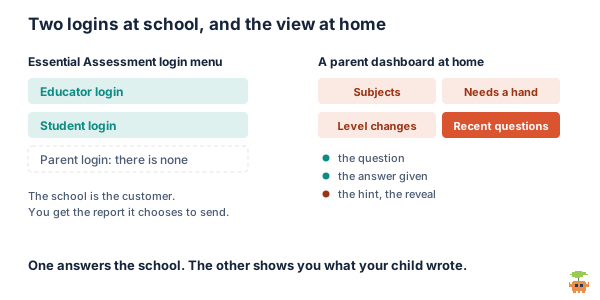
- The school report says where your child sits against the achievement standards, measured twice a term apart, for the class and the school.
- The home record says what happened on Tuesday night: which questions, which wrong answer, whether they asked for help.
The useful move is to bring one to the other. If the report names Measurement, look in Needs a hand and Recent questions for Measurement codes. If the teacher says “fractions”, check whether the same code is already on the list. A Level below the year in one strand is what a curriculum written as a continuum expects, and our page on working at a different Level covers what to make of it. For where the Levels and strands fit together, our Victorian Curriculum explainer is the place to start.
What this does not do
- It is not your school’s data. It cannot show the Essential Assessment result, the question-level analysis or any tier placement. Only the school can.
- It has no class comparison. There is no percentile or class average. The only reference point is the curriculum.
- It does not record time. Each question is stamped with when it was answered, not how long it took.
- It is a record of practice, not proof it is working. The dashboard makes checking possible. It does not do the checking, and a cold retest the next day is still the honest test.
For what to do with a gap once you have found one without hiring anyone, see how to help your child with maths at home.
The short version
There is no Essential Assessment parent login, app or portal. Its login menu lists an educator login and a student login, the school buys it, and you see the report the school chooses to send. Ask the school which strand it concerns, whether it was the pre or the post, and for a topic to work on.
If you want to see the questions themselves tonight, Sprout Tutor’s parent dashboard keeps each one with the answer given, the hint and the reveal, plus the codes your child is stuck on and a dated log of Level changes. It is in public beta, Victorian Curriculum only, and free on every plan while in beta.
See what your child is really being asked, one question at a time. Create a free account.
Sprout Tutor facts on this page were checked against the Sprout source code on 5 October 2026. The dashboard is under active development during the beta, so treat the screen names and limits as accurate at that date. Essential Assessment facts are as described above and in our report page. We build competing software and say so. VCAA does not endorse Sprout.
FAQ
Is there an Essential Assessment parent login?
No. Essential Assessment sells to schools, and its public login menu, checked on 5 October 2026, lists an Educator Login and a Student Login with no parent or family entry. Parents receive whatever report the school chooses to send. If you want more than that, ask the school, since sharing the report or the question-level analysis is a school decision.
Can I use the Essential Assessment student login to see my child's results?
The student login is how a child sits an assessment their teacher has set, not a route to the results report, and how a student gets in is arranged by the school. Your child's results sit with the teacher's educator account. The practical route is to ask the teacher which strand the report concerns, whether it was the pre or the post, and whether you can see the question-level analysis.
Is there an Essential Assessment app for parents?
Not one that Essential Assessment offers, and treat any site offering to sell you parent access with caution until you have checked with your school. If you want a parent-side record of your child's maths, Sprout Tutor's parent dashboard keeps every practice question as your child saw it, the answer they gave, whether they opened the hint and whether they revealed the answer. It is a separate home record and does not read the school's Essential Assessment results.
How can I see my child's maths questions?
At school, only through the teacher, who can see question-level analysis in Essential Assessment and may share or describe it. At home, the Sprout Tutor parent dashboard opens each recent question in full: the wording, every option shown, the answer given beside the correct one, the hint text and the working. It lists the last hundred questions, one tab per subject, and is visible only to the signed-in account holder.
Which years and curriculum does Sprout Tutor cover?
Sprout Tutor covers Years 1 to 10 of the Victorian Curriculum. It follows the Victorian Curriculum F-10 Version 2.0 only, in English, maths and science, and has been in public beta since 22 September 2026. It does not cover other states or curricula yet, and while it is in beta it is free on every plan, including the free one.