
The Victorian Curriculum was never written as a list of years. It is written as Levels, and the VCAA describes it as “a sequentially-developed continuum of learning”. A Year 4 child working at Level 3 in one part of maths is not off the edge of the document. The document was built to describe exactly that child.
That matters to a parent in two situations: when a report or a teacher says your child is working below (or above) their year, and when a tool like Sprout Tutor moves them to a different Year from their class. This page covers what the Levels are, what a different working Level does and does not tell you, and exactly how and when the tutor makes that move.
Levels, not years
Open the VCAA’s mathematics curriculum and the headings are Levels, not years: Foundation Levels A, B, C and D, then Foundation, then Levels 1 to 10, then Level 10A. In practice Level 4 is what most Year 4 students are learning, which is why nearly everyone, us included, says “Year 4”.
Two ends of that list are the tell. Foundation Levels A to D sit before Foundation, for learning that comes before it. Level 10A sits after Level 10 as optional extension. A curriculum that expected every child to be at the same place at the same age would not need either. Victoria’s names learning that happens before the first year of school and after the last one, because it expects children to be spread along the line.
The VCAA’s own overview of Version 2.0 says the continuum is expressed through achievement standards and content descriptions that let teachers “plan, monitor, assess and report on the learning achievement of every student”. Every student, wherever they are on it. For how the Levels fit with the rest of the document, see our plain-English tour.
A different Level is usually one strand, not a whole child
Victorian maths has six strands in Sprout Tutor: Number, Algebra, Measurement, Space, Statistics and Probability. English has three (Language, Literature, Literacy), and so does science (Understanding, Human Endeavour, Inquiry). A child is rarely behind or ahead across all of them at once.
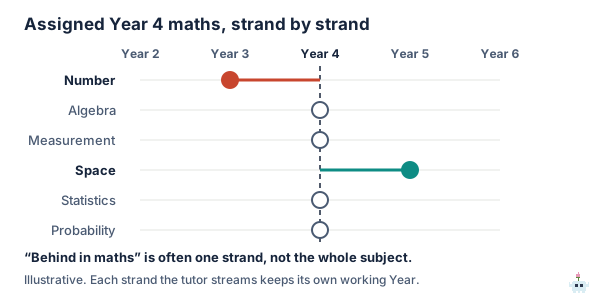
“Behind in maths” very often means “behind in Number”. Number is the largest maths strand at every Level from 1 to 6 (between 6 and 10 content descriptions a Level) and the one everything else leans on, so a gap there shows up everywhere and makes the whole subject look shaky. The same child can be comfortably at Level 5 in Space, because turning and reflecting shapes does not depend on fluent multiplication. A single “working below” for the whole subject hides that, and it changes what you would do about it.
How Sprout Tutor handles it
Sprout Tutor went into public beta on 22 September 2026. It follows the Victorian Curriculum only, for Years 1 to 8, and while it is in beta it is free on every plan. It keeps two Years for each subject:
- The assigned Year is the one you set, normally your child’s school Year. It does not change unless you change it.
- The working Year is where the tutor currently has them practising. It starts at the assigned Year and moves by fixed rules.
When your child picks a strand for a sitting (“just Number today”), that strand keeps a working Year of its own. So the tutor can have them practising Year 3 Number while Space stays at Year 4, which is the shape in the figure. The dashboard shows it the same way: each subject reads “Assigned Year 4”, followed by “practising Year 3” when the working Year has moved, and a chart plots every strand against the assigned Year.
When it moves, in numbers
These are read from the tutor’s code, and the full set of rules is on its own page:
- Down a Year: five wrong answers in a row at the easiest tier (support). A revealed answer counts as wrong; a right answer resets the count. Starting from the middle tier, the fastest route down is ten wrong answers in a row.
- Up a Year: three right answers at the hardest tier (stretch). They do not have to be in a row. Starting from the middle tier, the fastest route up is six right answers in a row.
- Where it lands: a move down starts the Year below at its hardest tier, because struggling with the easiest Year 4 work sits closer to the hardest Year 3 work than to the easiest. A move up starts the Year above at the middle tier.
- Where it stops: the beta covers Years 1 to 8, so there is no move below Year 1 or above Year 8. Foundation, and Foundation Levels A to D, are not covered yet.
Every move is written down
The tutor never changes a working Year silently. Each move adds a line to the dashboard’s Level changes list: the subject and strand, the Year it moved from and to, up or down, the date, and who made it, “system” for an automatic move or “you” for yours. The code only ever adds lines to that record; it never edits or removes one.
This was a deliberate choice. A working Year on its own is just a current state, and a current state cannot tell you that your child was moved down in March and climbed back in May. The list can, and that history is often the most reassuring thing on the page.
You can overrule it
If you think a move is wrong, change the assigned Year on your child’s Tutor page. That is logged as “you”, and it resets every strand to the Year you chose, so per-strand moves start again from there. You know things the rules cannot: that it was a bad day, that the class has not reached this topic yet, that your child was guessing to get to the Sprout cosmetics.
What a different working Level does not mean
- It is not a diagnosis. A move down in the tutor means one run of answers on one strand, on the question types the tutor uses. It is a reason to look, not a conclusion about your child.
- It is not a school report. Your child’s teacher assesses against the achievement standards with far more evidence than any practice tool has, including work you never see. Where the tutor and the school disagree, ask the school what they are seeing.
- It is not permanent. The same rules that move a child down move them back up, and the climb is the quicker of the two.
- Working above is not automatically good news either. Racing a strand two years ahead while another sits a year behind widens the gap between them. It is usually worth spending the time on the lower one.
What to do when the tutor moves your child down
- Open the questions, not the summary. The dashboard keeps the actual questions your child answered, the options they saw, their answer and whether they used a hint. Five wrong answers that are all the same mistake point to one idea to fix. Five scattered ones may just be a tired afternoon.
- Look up the code it names. Each topic on the dashboard carries its Victorian curriculum code. Our Level 3 and Level 4 maths pages set out what each code covers.
- Let it run for a week before deciding anything. The tutor starts the lower Year at its hardest tier on purpose, so a child who only had a wobble tends to climb back quickly, and the Level changes list will show it.
- Mention it to the teacher if it holds. Something like “at home she keeps getting stuck on this code, are you seeing that too?” is a far better conversation than “an app says she is behind”. If you are working out a plan from there, our guide to catching up covers the rest.
If you are not in Victoria
Everything above about Levels is specific to the Victorian Curriculum. Most other states and territories use the Australian Curriculum Version 9, which is organised by year, and New South Wales organises its syllabuses by stage. The differences are set out here. Sprout Tutor covers the Victorian Curriculum only during the beta.
The short version
The Victorian Curriculum is organised as Levels on a continuum, from Foundation Levels A to D up to Level 10A, so a child working at a different Level from their school year is something the document expects rather than an exception. It usually applies to one strand, most often Number, rather than the whole subject.
Sprout Tutor keeps an assigned Year that you set and a working Year that moves by fixed rules, per strand. Five wrong in a row at the easiest tier moves down a Year and three right at the hardest tier moves up one. Every move is listed on the dashboard with its date and who made it, and you can overrule any of them.
Create a free account, add your child and switch the tutor on. It is free on every plan while the beta runs.
How this page was checked: the Level headings were read from the VCAA’s Version 2.0 mathematics curriculum page and the continuum wording from its overview page on 23 September 2026. The tutor’s thresholds, per-strand working Years and change log were read from its source code the same day, and the thresholds were confirmed by running the engine. Victorian Curriculum F–10 Version 2.0 © VCAA, which does not endorse this product; the curriculum is available at f10.vcaa.vic.edu.au.
FAQ
Is the Victorian Curriculum organised by year or by Level?
By Level. The VCAA's Version 2.0 curriculum pages are headed Foundation Levels A, B, C and D, then Foundation, then Levels 1 to 10, then Level 10A, and the VCAA describes the curriculum as a sequentially-developed continuum of learning. In practice Level 4 is what most Year 4 students are learning, which is why people usually say Year 4.
What does it mean if my child is working below their year level in Victoria?
It means that in some part of a subject your child is working on content from an earlier Level than their school year. The Victorian Curriculum is built as a continuum precisely so that can be described, and it usually applies to one strand, such as Number in maths, rather than the whole subject. It is a reason to look at what they are getting wrong and to talk to their teacher, not a diagnosis.
How does Sprout Tutor decide to move my child to a different Year?
Sprout Tutor keeps an assigned Year that the adult sets and a working Year that moves by fixed rules. Five wrong answers in a row at the easiest tier moves the working Year down, landing at the hardest tier of the Year below. Three right answers at the hardest tier moves it up. Starting from the middle tier, the fastest move down is ten wrong answers in a row and the fastest move up is six right answers in a row. A strand chosen for a sitting keeps a working Year of its own.
Can I see when Sprout Tutor moved my child up or down?
Yes. Every move adds a line to the Level changes list on the dashboard, showing the subject and strand, the Year it moved from and to, the direction, the date, and whether the system or you made it. The code only ever adds lines to that record. You can overrule any move by changing the assigned Year on your child's Tutor page, which is logged as your change.
Which Years does Sprout Tutor cover?
Sprout Tutor went into public beta on 22 September 2026 and covers the Victorian Curriculum F-10 Version 2.0 only, for Years 1 to 8, in English, maths and science. It does not move a child below Year 1 or above Year 8, and Foundation is not covered yet. While it is in beta it is free on every Sprout plan, including the free one.